Share your café Wi-Fi with a QR code (and stop reading out passwords)
How Wi-Fi QR codes work on iPhone and Android, how to set one up for guests, and how to change your password without reprinting anything.
· 2 min read · Tapstand team
"What's the Wi-Fi password?" might be the most-asked question in any café. Each time, a barista stops what they're doing, spells out a long password, and gets it repeated back wrong. A Wi-Fi QR code ends that.
How Wi-Fi QR codes work
A Wi-Fi QR code holds a short piece of text in a standard format, for example WIFI:T:WPA;S:BrewBloom_Guest;P:yourpassword;;. That's the security type, the network name and the password. When a phone's camera reads it, the phone offers to join the network. No typing.
- iPhone: the built-in Camera app reads Wi-Fi QR codes on iOS 11 and later. Tap the banner to join.
- Android: built into the camera or Google Lens on Android 10 and later; most phones from the last few years.
Two ways to share it
1. A printed Wi-Fi QR code
Print the code and put it on the counter or the wall. Guests scan it with their camera and join in one tap. Tapstand generates this code from your network details, ready to download and print.

2. A Connect to Wi-Fi button on your page
Guests who've tapped your table stand for the menu can also tap Connect to Wi-Fi. Web pages aren't allowed to join networks on a phone's behalf, so the page shows the network name and password with copy buttons and a shortcut to Wi-Fi settings: two taps instead of typing.
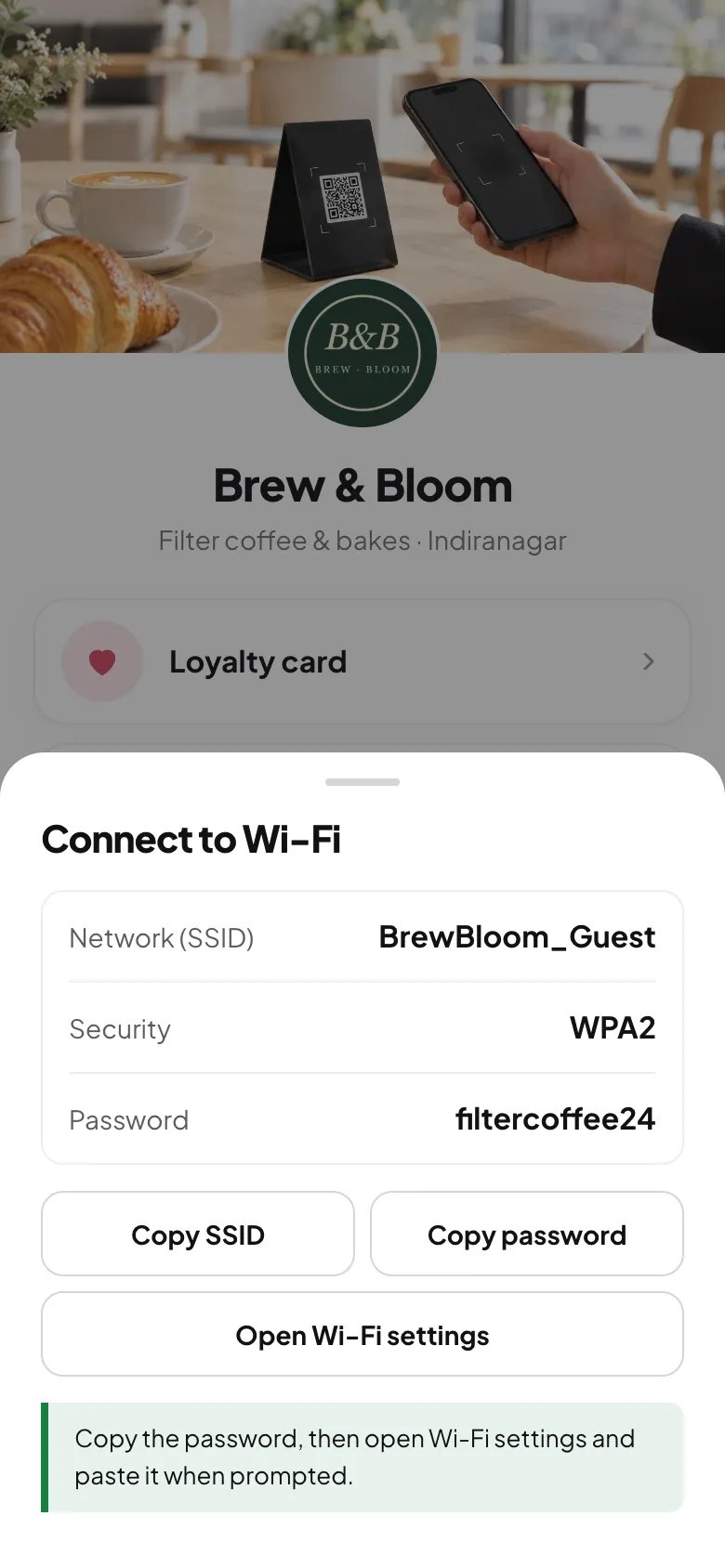
The bonus: guests who open your page for the Wi-Fi also see your loyalty card and feedback button. Wi-Fi is one of the few things everyone taps for, which is why it's such a good way in. See digital stamp cards.
Changing the password
Changing your guest Wi-Fi password every few months is good practice. The Connect to Wi-Fi button updates as soon as you save the new details. A printed Wi-Fi QR code contains the password itself, so it must be reprinted after a change.
Good habits for café Wi-Fi
- Name it clearly: "BrewBloom_Guest" beats "TP-Link_4F2A".
- Use WPA2 or WPA3 security, not an open network.
- Put the router up high and central, away from the espresso machine and microwave.
- Watch your feedback: if "Wi-Fi" keeps coming up as a complaint tag, it's time for a second access point. See handling feedback.
Frequently asked questions
Do Wi-Fi QR codes work on all phones?
On iPhones with iOS 11 or later and on most Android phones from Android 10 onwards, using the built-in camera. Older phones can use a QR scanning app or type the password.
Is it safe to share Wi-Fi with a QR code?
It's as safe as telling people the password. Share a separate guest network and change its password from time to time.
Sources
Screenshots show Tapstand with a sample café and demo data.